Early access: the 14 day free trial is ready to download. Checkout opens soon.

A newsletter app for the Mac
Own the app. Own the list. Pay Amazon’s price for email.
Pressbird is a native Mac app for writing and sending your newsletter through your own Amazon SES account. Pay $89 once, then Amazon’s rate for delivery, $0.10 per 1,000 emails on SES a la carte pricing. Your subscribers live on your Mac and in your own free Cloudflare account, never on our servers.
14 days, everything included. No account and no card. Requires macOS 26.
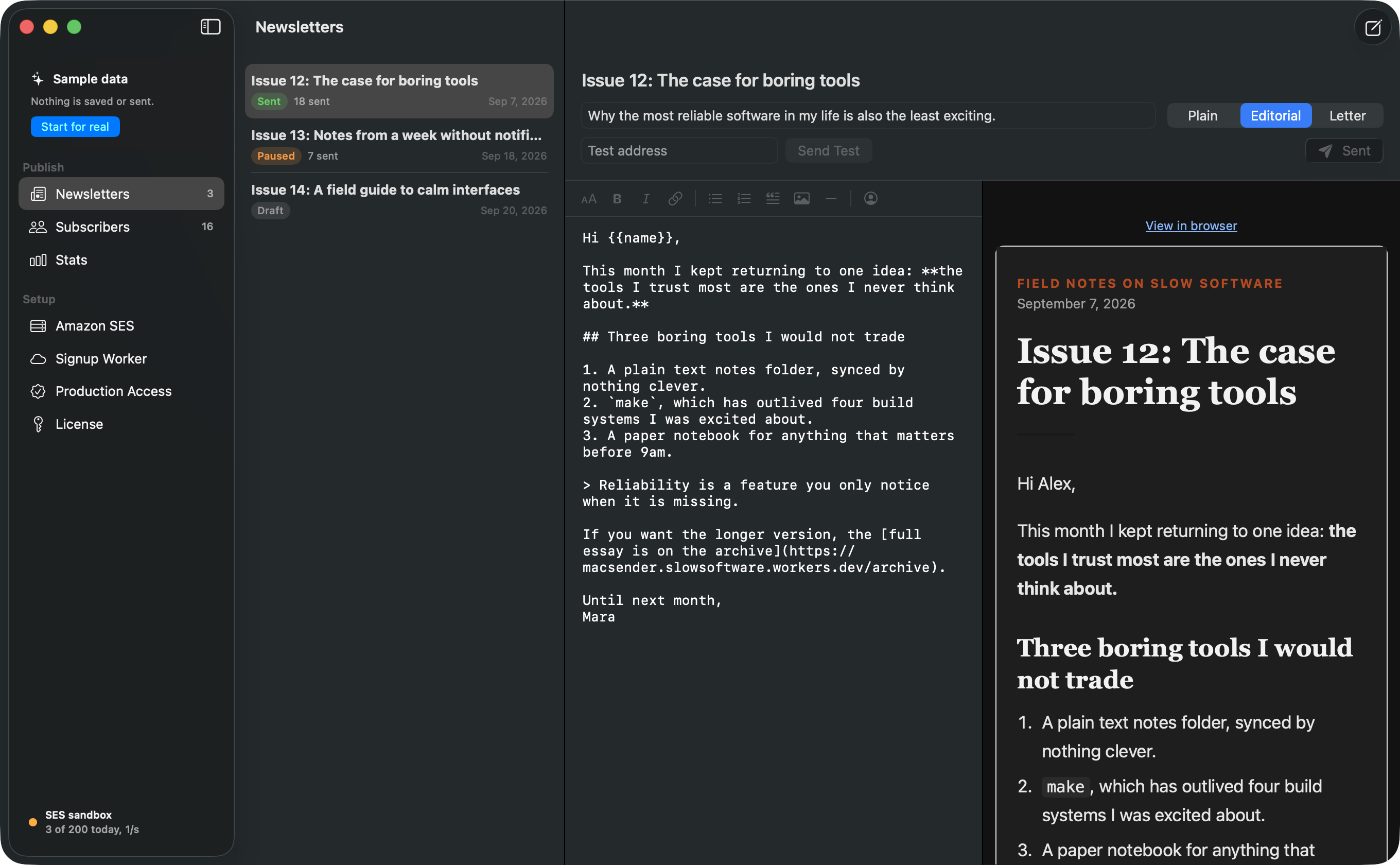
- Write in Markdown, with a formatting bar for headings, links, lists and each reader’s name.
- See the real email beside your draft, exactly as it will arrive.
- Pick a template: Plain, Editorial or Letter.
- Send yourself a test before you send to the list.
A real Mac app, not a web page in a box.
Made for macOS 26 in SwiftUI. Your Amazon key stays in the Keychain, your library is a file on your disk, and the editor answers to ⌘B, ⌘I and ⌘K.
Stop renting your readers.
Pay once, then Amazon’s price.
Pressbird costs $89, one time, with every 1.x update included. Email goes out through Amazon SES on your own AWS account, and Amazon bills you directly. There is no per subscriber price, so a bigger list costs you a few more cents, not a new plan.
What you pay, in full
- Pressbird, one key for 2 Macs
- $89 once
- Every 1.x update
- Included
- Amazon SES, a la carte pricing
- $0.10 per 1,000 emails
- A weekly issue to 2,000 readers
- About $0.20
- Signup service, Cloudflare free plan
- $0
Amazon bills sending to your own AWS account, so you see every cent. New SES accounts start on the Essentials plan at $0.16 per 1,000; you can switch to a la carte in the SES console at any time.
Your list lives with you.
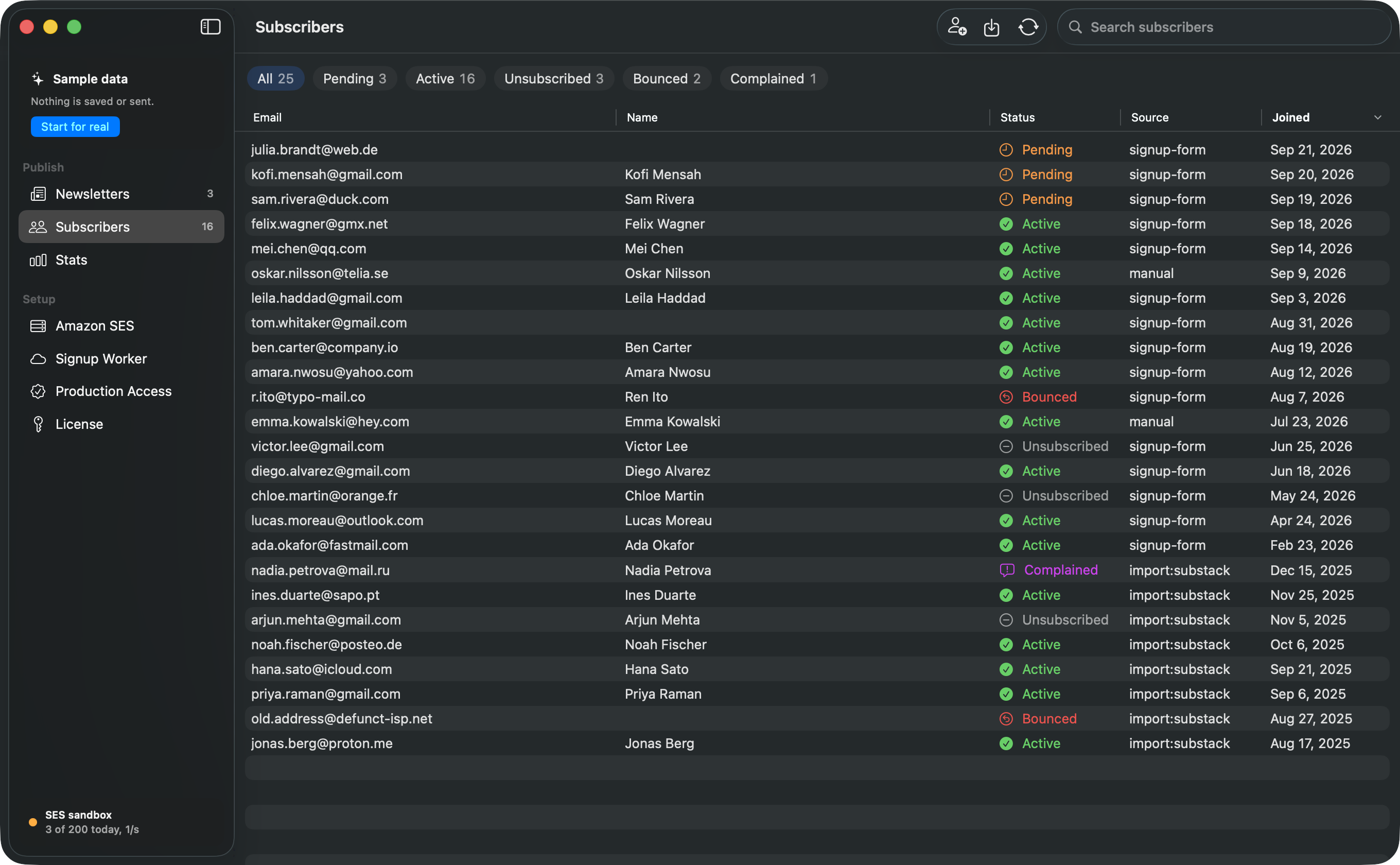
Subscribers are stored on your Mac and in a small signup service Pressbird deploys into your own free Cloudflare account. It runs your double opt-in signup form, one click unsubscribe, bounce and complaint handling and a public archive of past issues. We run no servers that hold your list, your drafts or your readers’ addresses.
- A signup form you can embed on any site
- Your library is a plain JSON file on your Mac; the online copy is in your Cloudflare account
- The signup form keeps collecting readers whether or not you ever buy
A Mac app made for writing.
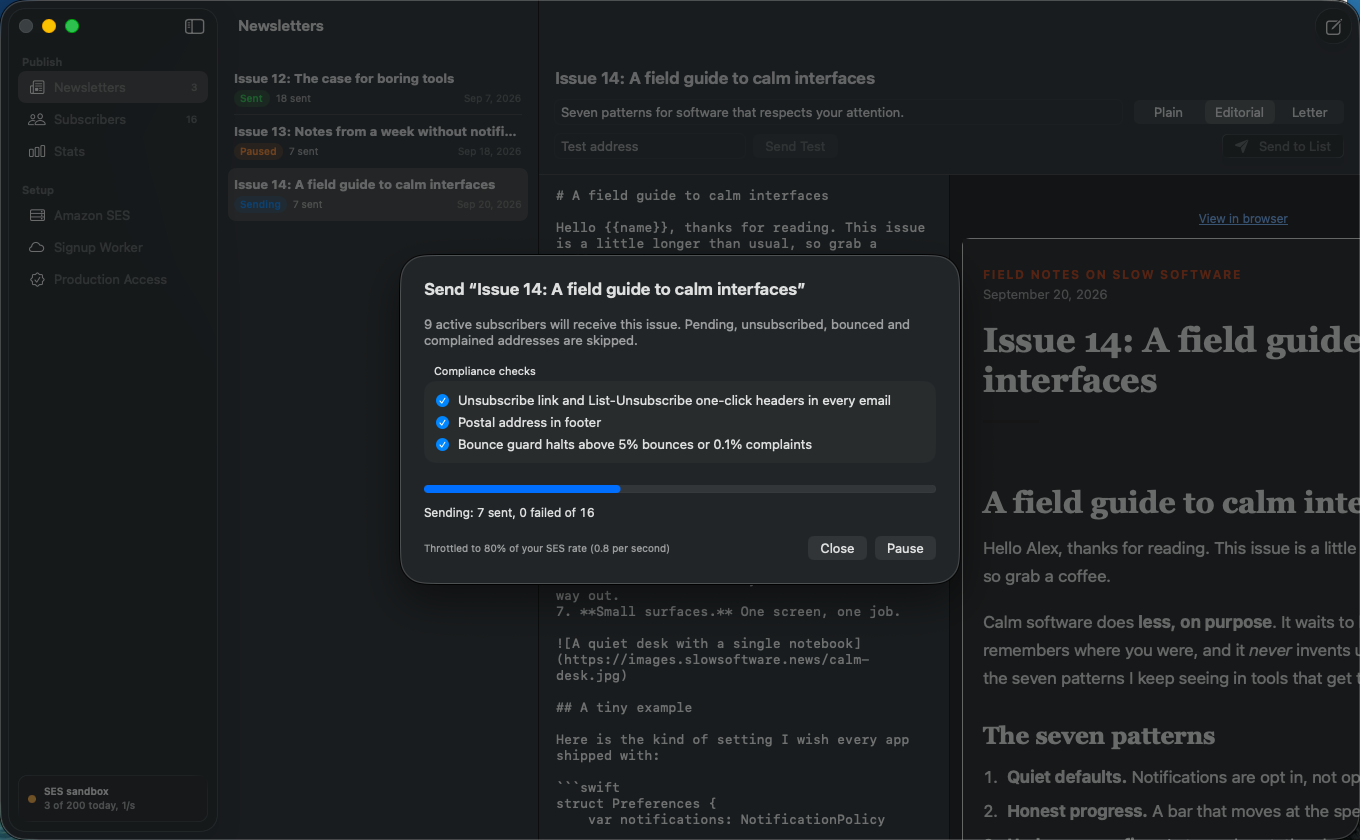
Write in Markdown with the finished email beside it. Greet readers by name, send yourself a test, then send to the list. Sending is paced to 80% of your SES rate, can be paused and resumed, and picks up where it stopped without sending anyone a second copy.
- Three templates that render well in mail apps
- Import CSV exports from Substack, beehiiv and Mailchimp, or any file with an email column
- Pause, resume and a safe restart for big sends
Setup in plain words, including the hard part.
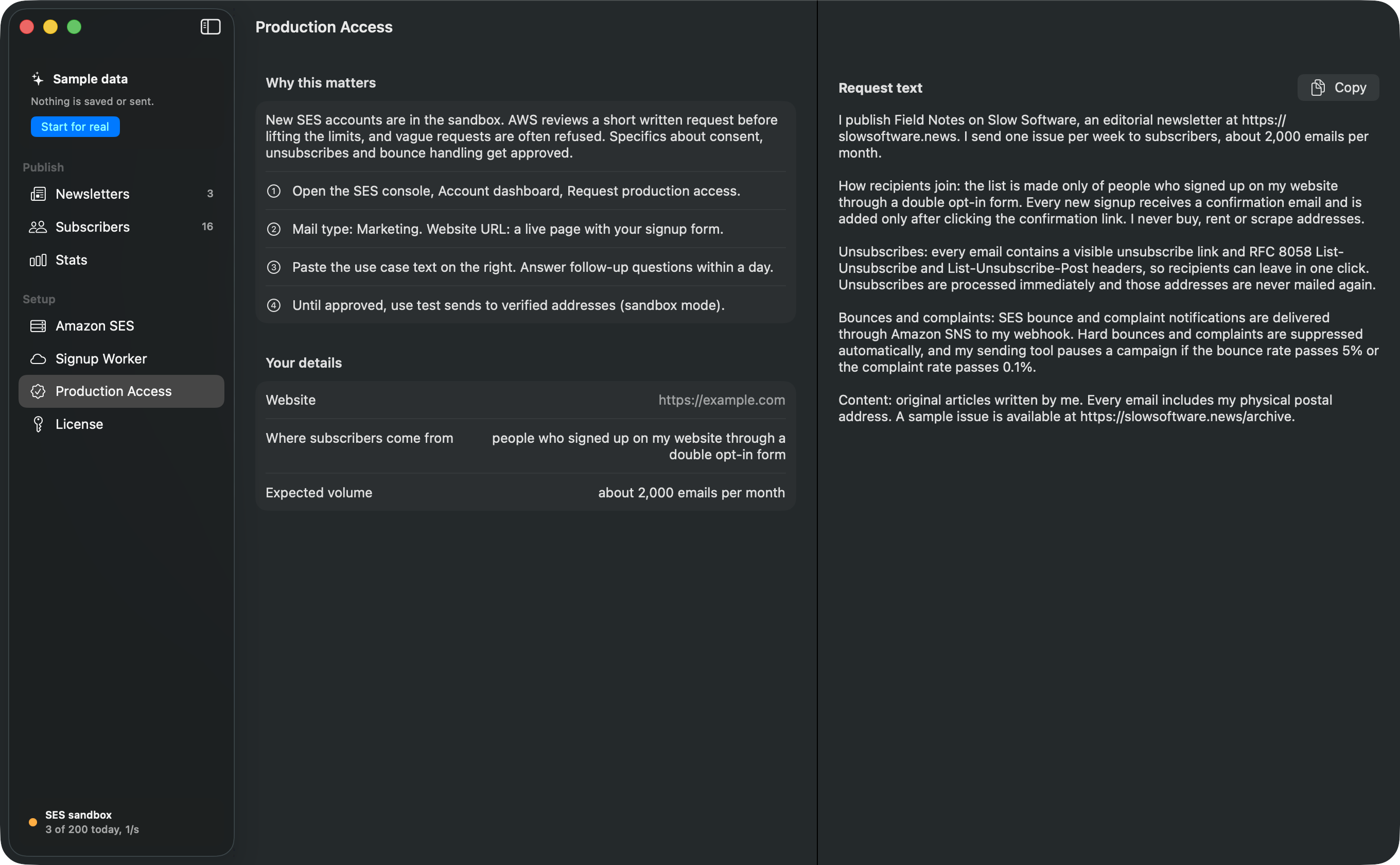
Amazon is the cheapest way to send email and the most confusing to set up. Pressbird walks you through it in plain steps. New SES accounts start in a sandbox, and AWS turns down vague requests to leave it, so Pressbird writes the production access request for you: how readers join, how unsubscribes work, how bounces are handled.
- AWS says it responds to production access requests within 96 hours
- Write, import and send tests while you wait
- The Amazon key can use five SES actions and nothing else in your AWS account
From a new AWS account to your first issue
About 15 minutes of setup, then AWS’s review. While you wait, you can write, import and send tests to yourself.
-
Connect Amazon.
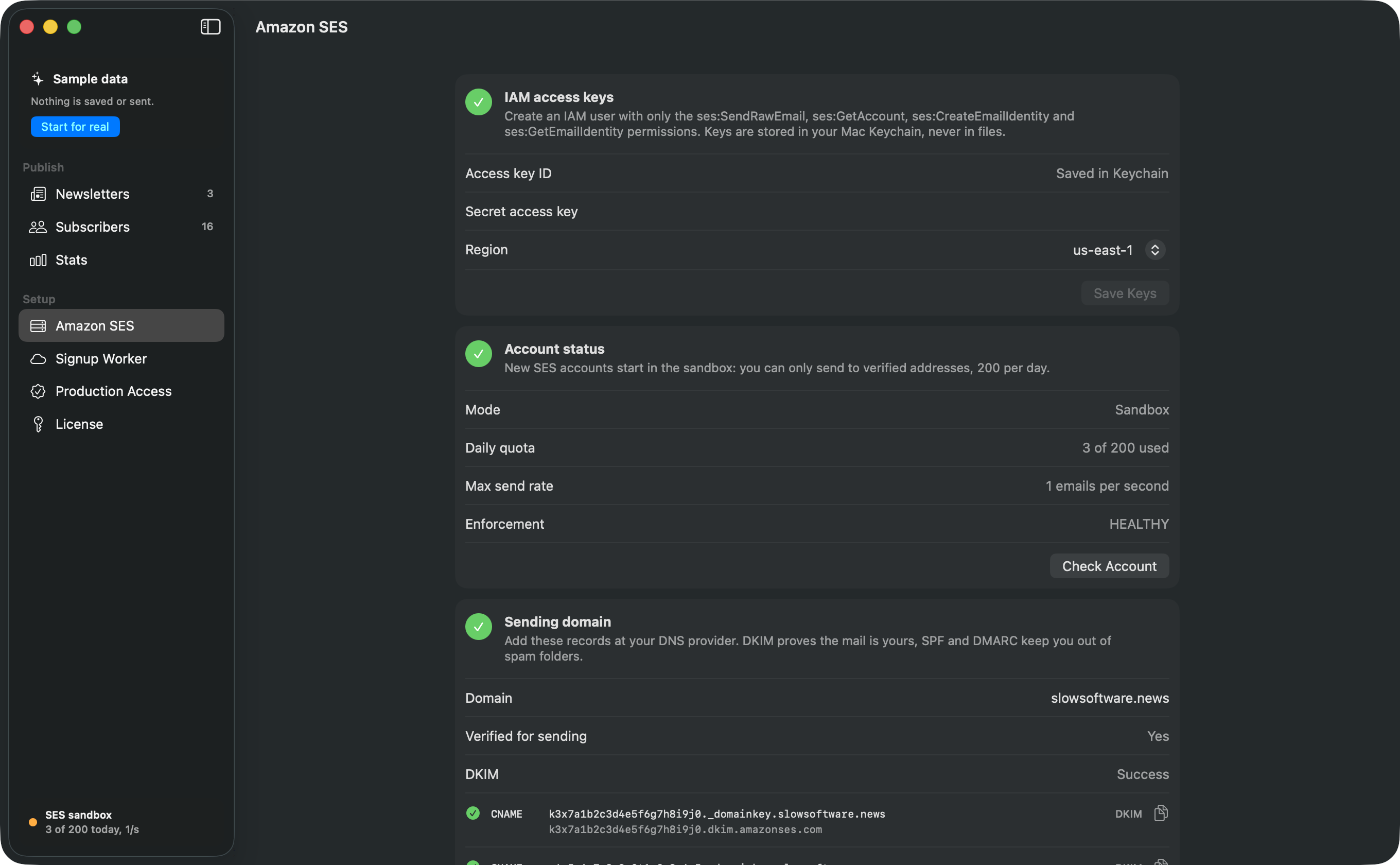
Create a send only key in AWS with the policy Pressbird gives you, and paste it in. It is saved in your Mac’s Keychain. Pressbird checks your account and shows your sending limits.
The whole IAM policy: five SES actions { "Effect": "Allow", "Action": [ "ses:SendEmail", "ses:SendRawEmail", "ses:GetAccount", "ses:CreateEmailIdentity", "ses:GetEmailIdentity" ], "Resource": "*" } -
Prove your domain.
Add the DKIM, SPF and DMARC records Pressbird shows you, each with a copy button. Then paste Pressbird’s production access request into the AWS console, so Amazon lets you mail your whole list.
What you paste at your DNS host ; DKIM, three of these CNAME token._domainkey.example.com token.dkim.amazonses.com ; SPF TXT example.com v=spf1 include:amazonses.com ~all ; DMARC TXT _dmarc.example.com v=DMARC1; p=none -
Deploy your signup service.
Connect your free Cloudflare account and Pressbird deploys a small worker there: the signup form, one click unsubscribe, bounce handling and your public archive. It keeps working while your Mac is asleep.
What your worker answers GET / signup form POST /subscribe double opt-in GET /confirm confirm link POST /unsubscribe one click, RFC 8058 POST /sns bounces, complaints GET /archive past issues -
Bring your readers and write.
Import your CSV from Substack, beehiiv, Mailchimp or anywhere else. Write in Markdown, send yourself a test, then send to everyone.
An issue, in Markdown Hi {{name}}, This week: **two links** and one short story. ## The links 1. [A slower inbox](https://…) 2. [Notes on paper](https://…)
What a year of newsletters costs
Our estimates for year one with a weekly issue, where every subscriber gets every issue. List prices in US dollars before tax, as of October 2026. Check each provider’s pricing page before you decide.
Estimated cost for the first year
| Service | 2,000 subscribers | 10,000 subscribers | How we got the number |
|---|---|---|---|
| Pressbird + Amazon SES | $99$106 on SES Essentials | $141$172 on SES Essentials | $89 once, plus SES at $0.10 per 1,000 for 104,000 and 520,000 emails ($10.40 and $52). On SES’s default Essentials plan ($0.16 per 1,000): about $106 and $172. Cloudflare free plan: $0. |
| Sendy + hosting + Amazon SES | $151 | $193 | $69 once, plus a small server we assumed at $6 a month ($72), plus the same SES cost. |
| Mailchimp | $540 to $720Essentials to Standard | $1,320 to $1,620Essentials to Standard | Monthly billing. The 2,500 contact tier is about $45 to $60 a month, the 10,000 contact tier about $110 to $135. The free plan stops at 250 contacts. |
| Kit | $590 to $710Creator plan. Free plan: $0 | $1,385 to $1,670Creator plan. Free plan: $0 | The free plan covers up to 10,000 subscribers, with Kit branding and no automations. Creator: the 3,000 tier is about $59 a month and the 10,000 tier about $139 on monthly billing, about 17% less billed yearly. |
| beehiiv | $830 to $950Lite plan. Free plan: $0 | $1,430 to $1,670Lite plan | The free plan covers up to 2,500 subscribers, with beehiiv branding. Lite, on the plans that started October 1, 2026: up to 2,500 is about $69 to $79 a month, up to 10,000 about $119 to $139, billed yearly or monthly. |
| Substack | $800If paid. Free newsletter: $0 | $4,000If paid. Free newsletter: $0 | Substack keeps 10% of paid subscription revenue. Our paid estimate assumes 5% of readers pay an average of $80 a year. Card fees are left out, since they apply wherever you take cards. |
| Pressbird, year two onward | $10 | $52 | Amazon’s sending cost only, while you stay on 1.x. Sendy repeats its hosting cost, and the platforms repeat their plan price. |
To be fairAt 2,000 readers, the free plans from Kit, beehiiv and Substack cost less than Pressbird in cash. Pressbird is for people who want no platform branding, no subscriber tiers and their list on their own machine. Past the free plan limits, the gap gets large.
What the estimates assume
- 52 issues a year, and the list stays the same size all year.
- No attachments and no dedicated IP address.
- AWS free tier credits for new accounts are not counted.
- You already own a domain. Pressbird and Sendy both need one to send through SES, about $10 to $20 a year otherwise.
- Your own time is not counted. Sendy also needs a server you keep updated.
- Mailchimp counts unsubscribed contacts toward your plan unless you archive them.
- Tiers are the closest published ones: Mailchimp’s 2,500 and Kit’s 3,000.
- Pressbird does not sell paid subscriptions, so the Substack paid figure only matters if you would collect payments elsewhere.
Sources, checked October 18, 2026
- Where sources disagreed, the table shows the higher published figure or a range.
- Amazon SES pricing, a la carte, Essentials and the July 21, 2026 default: aws.amazon.com/ses/pricing
- SES sandbox limits and the 96 hour review window: docs.aws.amazon.com
- Mailchimp plans: mailchimp.com/pricing. Tier prices: emailvendorselection.com (September 18, 2026). Lower estimate: automationatlas.io (July 2026)
- Kit plans and free plan limit: kit.com/pricing. Creator tier prices: emailvendorselection.com (August 9, 2026)
- beehiiv plans: beehiiv.com/pricing. The October 1, 2026 change: ppc.land
- Substack’s 10% fee, from third party summaries (confirm at support.substack.com): schoolmaker.com and emailsoftwareinsights.com
- Sendy license and update policy: sendy.co
- Small server reference, smallest Droplet at $4 a month: digitalocean.com
- Cloudflare Workers and D1 free plan limits: developers.cloudflare.com
Compliance is built in, not bolted on.
Every email carries your postal address and a working unsubscribe link, plus the List-Unsubscribe and one click (RFC 8058) headers that Gmail and Yahoo require from bulk senders. New signups confirm by email first. Hard bounces and complaints are recorded and never mailed again.
- Your postal address and an unsubscribe link in every issue
- One click unsubscribe headers, so mail apps can show their own button
- Double opt-in by default
- Bounced and complaining addresses are never mailed again
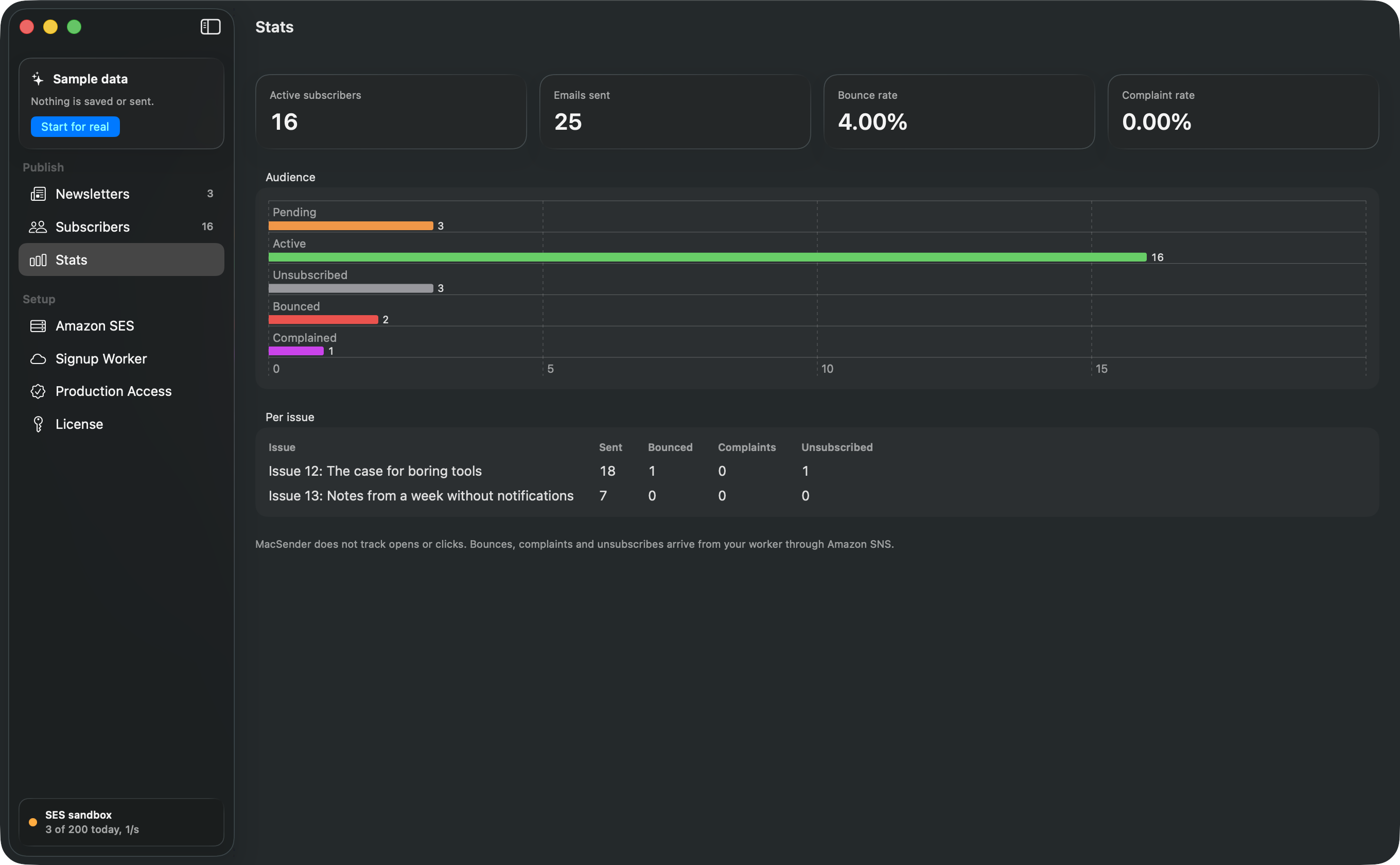
- A send stops on its own if bounces pass 5% or complaints pass 0.1%, after the first 50 emails
- DKIM, SPF and DMARC records, ready to paste into your DNS
- No open or click tracking: no tracking pixels and no rewritten links
List-Unsubscribe:
  <https://…/unsubscribe?t=…>,
  <mailto:…>
List-Unsubscribe-Post:
  List-Unsubscribe=One-Click
Who Pressbird is for, and who it isn’t for yet
Made for
- Writers who outgrew a free plan and don’t want the bill to grow with every new reader.
- Shops, studios, practices and local groups that send a customer newsletter from a Mac in the office.
- Mac people who buy their tools outright, and maybe gave up on running Sendy on a server.
Not the right tool yet if you
- sell paid subscriptions or paywalled posts through your newsletter.
- need open rates, click maps or A/B tests. Pressbird does no tracking, on purpose.
- need automations, welcome sequences, tags or segments.
- share one account across a team.
- would rather not have an AWS account at all.
Questions, answered plainly
Something else on your mind? Write to support@pressbird.app.
Do I need an AWS account?
Yes. Pressbird sends through Amazon SES on your own AWS account, so Amazon bills you directly for each email. Creating an AWS account is free but needs a card. Pressbird shows you how to create a key that can only use five SES actions (send email, read your sending limits, set up and check your domain), and stores it in your Mac’s Keychain.
What is the SES sandbox?
Every new SES account starts in a sandbox: it can only send to addresses you have verified, up to 200 emails a day, one per second. To mail your real list you ask AWS for production access. AWS reads each request and turns down vague ones, so Pressbird writes it from your details: your site, how readers sign up, how unsubscribes and bounces are handled.
AWS says it responds within 96 hours. Pressbird cannot promise approval, and while you wait you can import, write and send tests to yourself.
Do you see my list?
No. Your subscribers are stored on your Mac and in the signup service running in your own Cloudflare account. Your emails go from your Mac to Amazon. We run no servers that hold your list or your newsletters.
The app talks to us in two ways only: it checks pressbird.app for updates, and it checks your license key with our payment provider, Lemon Squeezy, which receives the key and your Mac’s name so you can see which Macs use your key.
What will sending cost me?
Amazon’s rate, billed to you by Amazon: $0.10 per 1,000 emails on SES a la carte pricing. New SES accounts start on the Essentials plan at $0.16 per 1,000 and can switch to a la carte at any time in the SES console. A weekly issue to 2,000 readers is about $10 a year on a la carte. Cloudflare’s free plan covers the signup service for most newsletters (100,000 requests a day).
Why do I need Cloudflare?
Something has to be online when you are not: your signup form, the unsubscribe link in last week’s issue, and Amazon’s bounce notices. Pressbird puts that piece in your own free Cloudflare account instead of on our servers, and syncs it with your Mac when you open the app.
Can I bring my list from Substack, beehiiv or Mailchimp?
Yes. Export a CSV from your current service and drop it in. Pressbird reads the Substack, beehiiv and Mailchimp formats and any CSV with an email column. People who unsubscribed or bounced stay that way, and duplicates are merged.
Make sure your list is people who asked for your newsletter. AWS and the inbox providers check.
Will my emails land in the inbox?
Nobody can promise that, and we won’t. Pressbird does what is in its control: it sets you up with DKIM, SPF and DMARC, adds the one click unsubscribe headers Gmail and Yahoo require, confirms new signups, drops bounced and complaining addresses, and stops a send if bounces or complaints climb. Your list quality and your content do the rest.
Can I run a paid newsletter?
Not in version 1. Pressbird does not take payments, gate posts or send to paying readers only. If paid subscriptions are central to your newsletter, a platform like Substack or beehiiv is a better fit today.
What about the Mac App Store?
Pressbird is sold here first, as a notarized download with automatic updates. A Mac App Store version is planned later. It will be a separate purchase through Apple, so a key bought here works with the version from this site, which keeps updating on its own.
What happens after the trial, and can I get a refund?
The 14 day trial includes everything, with no account and no card. After it ends, writing, previews, importing, your signup form and test sends keep working for free; only sending to your whole list needs a license.
If Pressbird is not for you, email support@pressbird.app within 30 days of buying for a full refund, no questions asked. Your newsletters, your list and your Cloudflare signup service stay yours either way.
Try Pressbird free for 14 days.
The trial includes everything, with no account and no card. When it ends, writing, previews, importing, your signup form and test sends keep working. Only sending to your whole list needs a license.
A notarized disk image for macOS 26 or later. Updates arrive inside the app.
What you need
- A Mac with macOS 26 or later
- An AWS account. Amazon bills you for each email
- A free Cloudflare account
- A domain you own, to send from
- A postal address for the email footer, as anti-spam laws require
The license
- $89 once. One key works on 2 Macs
- Every 1.x update included
- A full refund within 30 days, no questions asked
- Teachers, students and registered nonprofits pay $49. Ask at support@pressbird.app